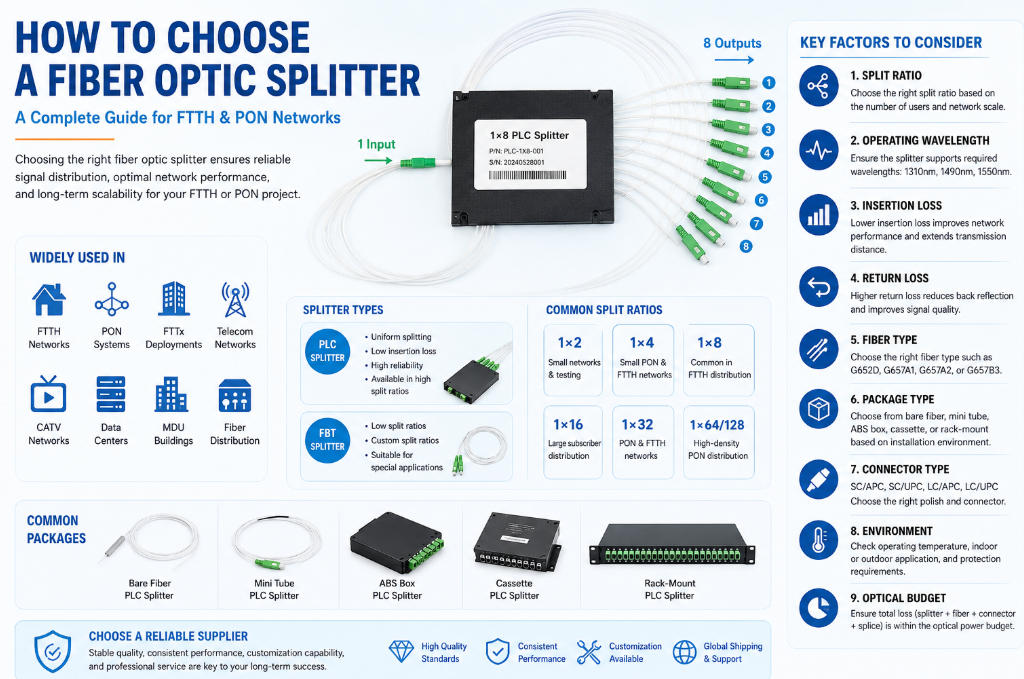
How to Choose a Fiber Optic Splitter: A Complete Guide for FTTH and Fiber Networks
Choosing the right fiber optic splitter is critical when designing an FTTH, FTTx, PON, or fiber distribution network. A splitter divides one optical signal into multiple outputs, allowing a single fiber connection to serve multiple users or network endpoints.
However, choosing a splitter is not simply about selecting a 1×2, 1×4, 1×8, or 1×16 PLC splitter. Factors such as split ratio, operating wavelength, insertion loss, connector type, packaging, fiber type, installation environment, and application all affect network performance.
This guide explains how to choose a fiber optic splitter and what specifications B2B buyers, telecom operators, installers, and network engineers should consider before purchasing.
What Is a Fiber Optic Splitter?
A fiber optic splitter is a passive optical device that divides an incoming optical signal into multiple output signals. Unlike active optical equipment, a passive splitter does not require an external power supply.
Fiber optic splitters are widely used in:
- FTTH networks
- FTTx deployments
- GPON and EPON networks
- PON systems
- Fiber distribution networks
- Data centers
- Telecom networks
- CATV networks
- MDU and building fiber networks
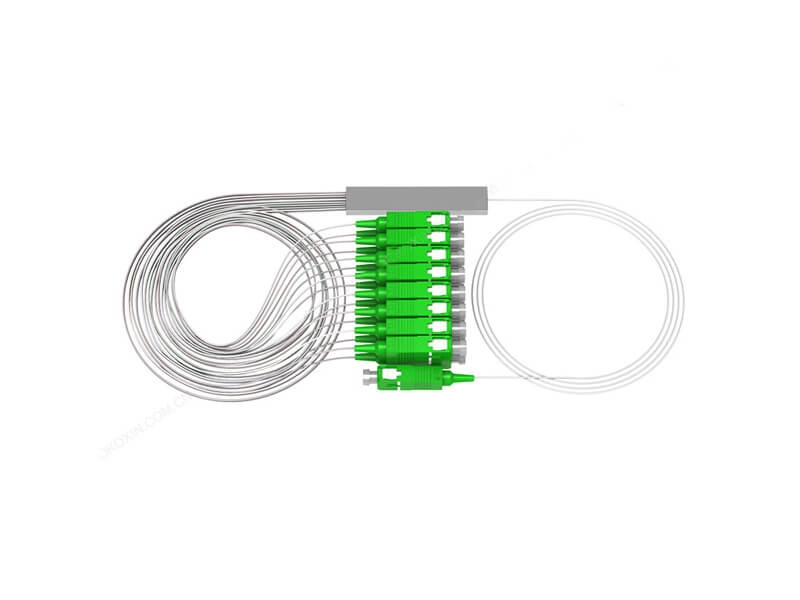
The most common technologies are PLC splitters and FBT splitters. For modern PON and FTTH networks, PLC splitters are widely preferred because they provide more uniform splitting across multiple outputs.
1. Choose the Right Split Ratio
The first step is determining how many output ports you need.
Common fiber optic splitter configurations include:
| Split Ratio | Typical Application |
|---|---|
| 1×2 | Small fiber networks and testing |
| 1×4 | FTTH distribution and small PON networks |
| 1×8 | Common FTTH distribution |
| 1×16 | Larger subscriber distribution |
| 1×32 | PON and FTTH networks |
| 1×64 | High-density PON deployments |
| 1×128 | Large-scale optical distribution |
For example, a 1×8 PLC splitter divides one optical input into eight output fibers. A 1×32 PLC splitter divides one input into 32 outputs.
The higher the split ratio, the greater the optical power loss. Therefore, you should not automatically choose the largest available split ratio.
How Do You Choose the Split Ratio?
Consider:
- Number of users or endpoints
- Required optical power
- Fiber link distance
- Optical budget of the PON system
- Number of future subscribers
- Available space in the distribution box or cabinet
For a small FTTH project, a 1×4 or 1×8 splitter may be sufficient. Larger networks may require 1×16, 1×32, or 1×64 splitters.
2. PLC Splitter vs. FBT Splitter
Another important consideration is splitter technology.
PLC Splitter
PLC (Planar Lightwave Circuit) splitters use planar waveguide technology to divide optical signals.
Advantages include:
- Uniform splitting ratio
- Low polarization dependence
- Good wavelength performance
- Stable optical performance
- Available in high split ratios
- Suitable for PON and FTTH networks
PLC splitters are commonly available in configurations such as 1×2, 1×4, 1×8, 1×16, 1×32, and 1×64.
FBT Splitter
FBT (Fused Biconical Taper) splitters are manufactured by fusing optical fibers together.
They can be useful for:
- Low split ratios
- Customized splitting ratios
- Some legacy networks
- Specialized applications
For modern large-scale FTTH deployments, PLC technology is often a more practical choice because of its uniformity and scalability.
3. Check the Operating Wavelength
Before purchasing a fiber optic splitter, verify that its wavelength range matches your network.
Common PON wavelengths include:
- 1310 nm
- 1490 nm
- 1550 nm
Many PLC splitters are designed to support a broad wavelength range, making them suitable for PON and FTTH applications.
For broadband PON networks, make sure the splitter’s wavelength specifications are compatible with the optical signals used by your OLT and ONT/ONU equipment.
4. Compare Insertion Loss
Insertion loss (IL) is one of the most important specifications when selecting a fiber optic splitter.
Insertion loss describes how much optical power is lost when the signal passes through the splitter.
Generally:
Higher split ratio = higher insertion loss.
For example, a 1×2 splitter has considerably less theoretical splitting loss than a 1×32 splitter.
When evaluating a splitter, do not look only at the typical insertion loss. Also check:
- Maximum insertion loss
- Uniformity
- Wavelength
- Temperature conditions
- Connector loss
The splitter’s total optical loss must fit within the network’s available optical power budget.
5. Consider Return Loss
Return loss (RL) measures the amount of optical power reflected toward the source.
A higher return loss generally indicates better reflection performance.
Return loss becomes especially important in high-performance optical networks and applications where signal integrity is critical.
When comparing suppliers, check the specified return loss and the applicable testing standard.
6. Select the Correct Fiber Type
The fiber type should match your network design.
Common choices include:
- G652D
- G657A1
- G657A2
- G657B3
G657A2 fiber is particularly useful in FTTH installations because of its improved bend performance.
If the splitter will be installed in a crowded fiber distribution box, distribution box, wall-mounted terminal box, or MDU environment, bend-insensitive fiber can help simplify installation and fiber management.
7. Choose the Right Package
Fiber optic splitters are available in different packages depending on the installation environment.
Common options include:
Bare Fiber PLC Splitter
A bare fiber splitter is compact and suitable for integration into optical modules, splice trays, and customized equipment.
Mini Tube PLC Splitter
A mini tube PLC splitter is compact and commonly used where installation space is limited.
ABS Box PLC Splitter
An ABS box splitter provides additional mechanical protection and is convenient for installation in distribution equipment.
Rack-Mount PLC Splitter
Rack-mount splitters are designed for telecom racks, ODFs, and high-density network environments.
Cassette PLC Splitter
Cassette-type splitters are convenient for modular installation in fiber distribution systems.
The best package depends on where the splitter will be installed and how the fibers will be managed.
8. Select the Correct Connector Type
Fiber optic splitters can be supplied with different connector configurations.
Common connector types include:
- SC/UPC
- SC/APC
- LC/UPC
- LC/APC
For many PON and FTTH networks, SC/APC is widely used because APC polishing helps reduce back reflection.
LC connectors are more compact and are often preferred where high-density fiber connections are required.
When ordering a splitter, clearly specify:
Input connector + output connector + connector polish type.
For example:
1×8 PLC Splitter, SC/APC Input, SC/APC Outputs
This prevents compatibility problems during installation.
9. Consider Connectorized vs. Unconnectorized Splitters
You can choose between connectorized and non-connectorized configurations.
Connectorized Splitter
Advantages:
- Faster installation
- Easy replacement
- No field splicing required
- Convenient for distribution boxes and patch panels
Unconnectorized Splitter
Advantages:
- Lower component cost
- Flexible fiber routing
- Suitable for fusion splicing
- Useful for integrated fiber distribution systems
For large B2B projects, the choice often depends on installation labor, network architecture, and total project cost.
10. Consider the Installation Environment
The installation environment is another key factor.
Ask where the splitter will be installed:
- Indoor cabinet
- Outdoor cabinet
- Fiber distribution box
- ODF
- Splice closure
- MDU
- FTTH terminal box
- Pole-mounted enclosure
- Underground enclosure
For outdoor applications, the splitter package should provide appropriate protection against environmental conditions.
For example, a splitter installed inside an outdoor fiber distribution box may require better mechanical and environmental protection than one installed inside an indoor telecom rack.
11. Check Operating Temperature
Telecom networks can operate in environments with significant temperature variations.
Before purchasing, check:
- Operating temperature
- Storage temperature
- Humidity
- Mechanical durability
- Environmental protection
This is especially important for outdoor FTTH deployments where equipment may be exposed to heat, cold, moisture, and other environmental conditions.
12. Consider the Optical Power Budget
This is one of the most important technical considerations.
A PON network has a limited optical power budget between the OLT and ONT.
The total optical loss can include:
Splitter loss + fiber loss + connector loss + splice loss + other passive component losses
For example:
Total link loss = Fiber loss + Splitter insertion loss + Connector loss + Splice loss
The total calculated loss should remain within the optical budget of the selected PON equipment, while maintaining an appropriate engineering margin.
Therefore, choosing a 1×64 splitter simply because it supports more users can be a mistake if the resulting optical loss exceeds the available power budget.
13. Think About Future Network Expansion
When designing a network, consider not only today’s requirements but also future expansion.
For example, if you currently have 20 subscribers but expect the network to grow to 50 or 100 subscribers, the splitter architecture should allow future expansion without requiring a complete redesign.
However, oversizing the splitter can increase optical loss and unnecessarily consume optical budget.
A good design balances:
Current capacity + Future expansion + Optical budget + Installation cost
14. Check Quality and Testing Standards
For B2B buyers, price should not be the only consideration.
A reliable fiber optic splitter supplier should provide consistent optical performance and appropriate quality control.
Important parameters to check include:
- Insertion loss
- Return loss
- Uniformity
- Directivity
- Polarization-dependent loss
- Wavelength performance
- Temperature stability
You can also ask suppliers about manufacturing processes, testing equipment, inspection procedures, and available certifications.
15. Choose a Reliable Fiber Optic Splitter Supplier
For distributors, telecom contractors, and system integrators, choosing the right fiber optic splitter supplier is just as important as choosing the product.
When evaluating a supplier, consider:
Product Range
A good supplier should offer different configurations, such as:
- 1×2 PLC splitter
- 1×4 PLC splitter
- 1×8 PLC splitter
- 1×16 PLC splitter
- 1×32 PLC splitter
- 1×64 PLC splitter
- Mini tube PLC splitter
- Cassette PLC splitter
- Rack-mount PLC splitter
Customization
B2B projects may require customized:
- Fiber lengths
- Connector types
- Connector configurations
- Split ratios
- Packaging
- Labels
- Fiber types
Production Capacity
For distributors and large projects, confirm whether the supplier can maintain stable production capacity and consistent quality for repeat orders.
Quality Control
Ask about optical testing, incoming material inspection, production inspection, and final testing.
Packaging
Proper packaging is important because fiber optic components are sensitive to mechanical damage during transportation.
How to Choose a Fiber Optic Splitter: Quick Checklist
Before placing an order, check the following:
Required split ratio
PLC or FBT technology
Operating wavelength
Maximum insertion loss
Return loss
Fiber type
Connector type
UPC or APC polishing
Fiber length
Package type
Indoor or outdoor application
Operating temperature
Optical power budget
Required certifications
Supplier production capacity
Customization requirements
Common Fiber Optic Splitter Applications
Fiber optic splitters are used in many network architectures.
FTTH Networks
In FTTH deployments, a PLC splitter can distribute one feeder fiber to multiple residential or business subscribers.
PON Networks
GPON, EPON, and other PON architectures use passive optical splitters between the OLT and ONTs/ONUs.
MDU Networks
In multi-dwelling units, compact PLC splitters can be installed in fiber distribution boxes and terminal equipment to serve multiple apartments or offices.
Telecom Distribution Networks
Splitters can be integrated into ODFs, cabinets, splice closures, and fiber distribution systems.
Fiber Optic Splitter vs. Fiber Patch Cord
A splitter and a fiber patch cord serve completely different functions.
A splitter divides one optical signal into multiple outputs, while a patch cord provides a fiber connection between two optical devices or distribution points.
In a typical FTTH network, you may find:
OLT → Fiber Optic Cable → PLC Splitter → Distribution Box → Patch Panel → Fiber Patch Cord → ONT
Other components, such as fiber jumper, patch cable, fiber pigtail, splice closure, distribution box, and patch panel, may also be used as part of the complete fiber connection system.
Final Thoughts
Choosing the right fiber optic splitter requires more than selecting the number of output ports. You should evaluate the split ratio, PLC technology, insertion loss, return loss, wavelength, fiber type, connector configuration, packaging, installation environment, and optical power budget.
For most modern FTTH and PON deployments, a properly specified PLC splitter provides a reliable and scalable solution. The key is to select a configuration that meets current capacity requirements without exceeding the network’s optical budget.
For B2B buyers, working with an experienced fiber optic splitter manufacturer and supplier can also make it easier to customize fiber length, connector type, packaging, and other specifications for different FTTH, FTTx, telecom, and data communication projects.
Frequently Asked Questions
1. What is the most common PLC splitter ratio?
1×8, 1×16, 1×32, and 1×64 PLC splitters are commonly used in FTTH and PON networks. The appropriate ratio depends on the network architecture and optical budget.
2. Is PLC splitter better than FBT splitter?
For many modern FTTH and PON applications, PLC splitters offer more uniform splitting and are available in higher split ratios. FBT splitters can still be suitable for certain low-ratio or customized applications.
3. Should I choose SC/APC or SC/UPC?
SC/APC is widely used in PON and FTTH applications because it provides lower back reflection. However, the connector must match the requirements of the network equipment and existing fiber infrastructure.
4. How do I calculate the required splitter?
Start with the number of required outputs, then calculate the total optical loss of the network. The splitter’s insertion loss must remain within the available optical power budget.
5. Can a PLC splitter be customized?
Yes. B2B suppliers commonly provide customization for fiber length, connector type, connector configuration, package type, labeling, and other requirements.